
Overview
Kernel is a platform that provides infrastructure for running browser and computer using agents. You can run your browser agents on Kernel to get top tier performance and developer experience. Kernel’s SDKs are tightly integrated with Laminar, allowing you to trace your agents down to the LLM calls and browser/computer actions.A version of this guide is available in Kernel’s documentation.
Advantages of using Kernel
- Reliable infrastructure and quick computer startup times.
- It’s open source!
- Reusable sessions, cookies, browser history and more.
- Stealth mode for browser automation avoids blockers and CAPTCHAs.
- Framework agnostic automations – you can use any browser framework you want.
Prerequisites
- A Kernel account.
- A Laminar account or a self-hosted instance.
- API keys for both Kernel and Laminar set as
KERNEL_API_KEYandLMNR_PROJECT_API_KEYenvironment variables.
Getting Started
Installation
- JavaScript/TypeScript
- Python
Setting up API keys
- Signup on the Kernel dashboard.
- Create an API key during the onboarding process or in the API keys page.
- Store the API key in the
KERNEL_API_KEYenvironment variable. - Create a Laminar project.
- Navigate to the project settings and create a new project API key.
Running agents on Kernel
Browser Use
Laminar provides observability for Browser Use and Kernel, so if you host your Browser Use agents on Kernel, you will get full observability of both the browser agent and the computer interactions. Full guide on browser-use integrationPlaywright
You can use Laminar to trace your Playwright browser sessions hosted on Kernel.- JavaScript/TypeScript
- Python
Deploying Kernel apps and using Kernel’s Computer and Process APIs
When you use Kernel’s App platform or use their Computer controls, Laminar will trace the computer and process interactions. In addition, you don’t have toobserve your kernel app.actions and worry about manual trace flushing inside your Kernel apps.
As a result of the example below, you will see the following in the Laminar UI:
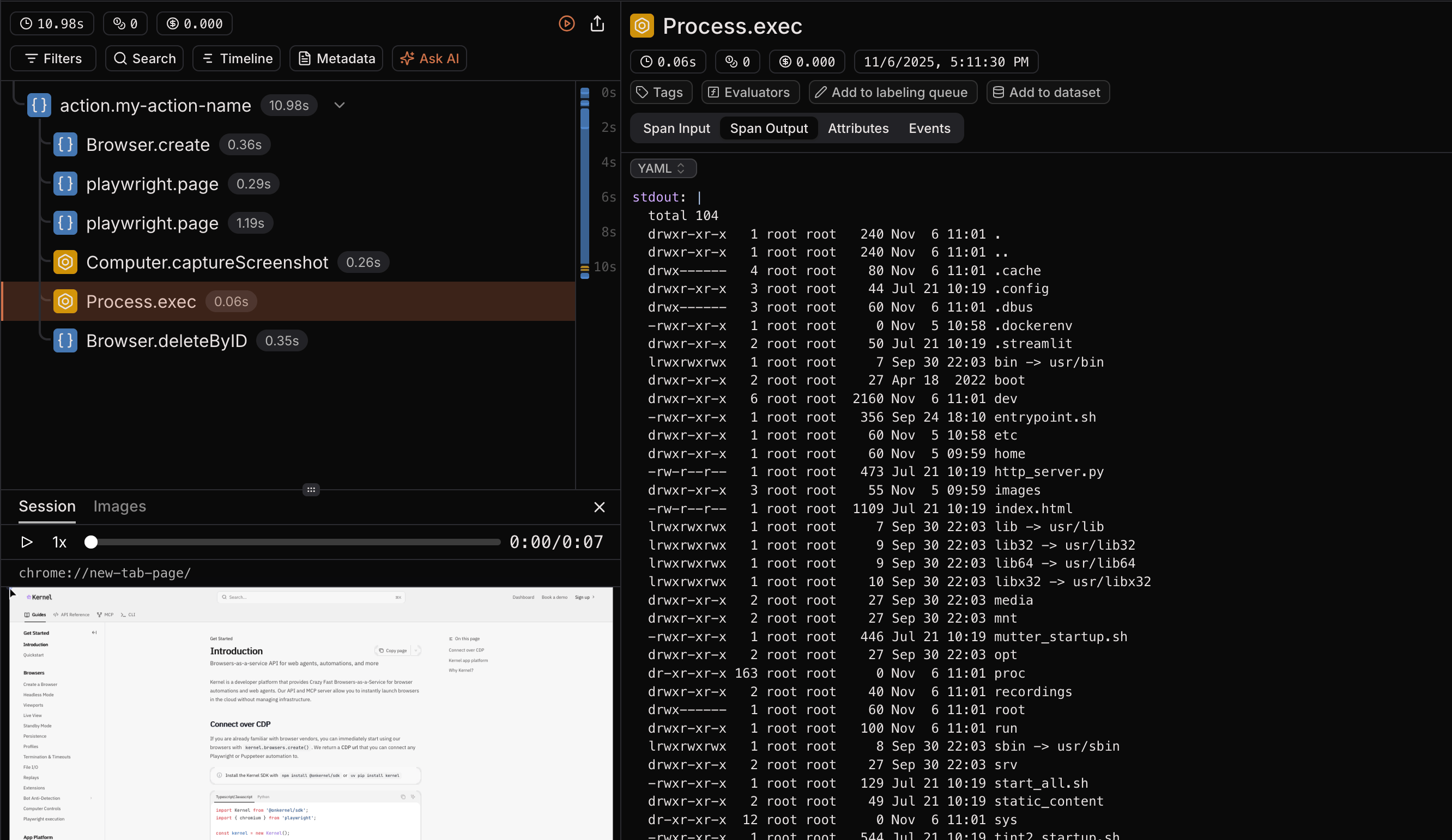
Example Kernel app with Laminar tracing
To deploy this example on Kernel, follow the steps in Kernel’s documentation.- JavaScript/TypeScript
- Python
Next steps
- Understand session replay for browser agents in more detail.
- Learn about Profiles in Kernel to persist browser state between runs.
- Learn about calling playwright directly through Kernel’s API.