Overview
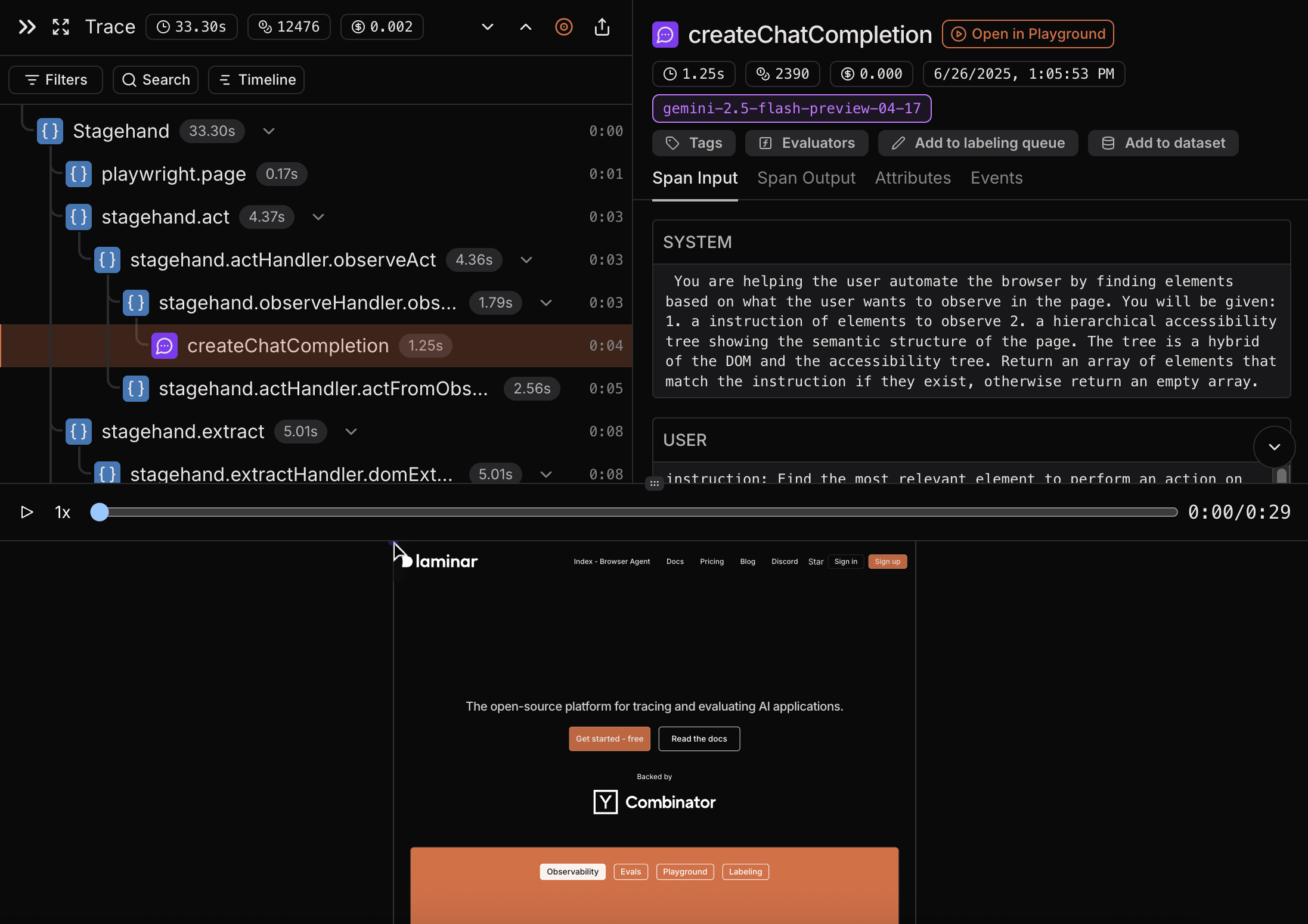
Stagehand is an AI Browser Automation Framework developed by Browserbase. Laminar provides native integration with Stagehand, allowing you to trace your Stagehand code with just a few lines of code. Laminar observability captures:- Full recording of a browser window while the code is running.
- Execution steps, such as,
act,extract,observeandagentcalls. - Full LLM calls, including the prompts and responses.
- LLM cost of the execution steps.
- Latency of the execution steps and LLM calls.
Quickstart
Below is an example of a simple Stagehand script. Highlighted lines are the ones that are required to trace Stagehand with Laminar.- Stagehand v3
- Stagehand v2
Step-by-step guide
1
Start with Stagehand Browser quickstart
2
Install Laminar
3
Initialize Laminar
First, we need to initialize Laminar at the start of your application and pass the Stagehand module to
instrumentModules.4
Finalizing Stagehand traces
If you run Stagehand in a standalone script, in order to flush queued Stagehand traces, make sure to call
stagehand.close() and Laminar.flush().Example of a Stagehand trace
You can see entire session recording of a browser window while the code was running, along with execution steps, such asact and extract. You can also see LLM cost of the entire execution and of each execution step. For LLM spans you can see the prompt, the response and the model name.